
CRM
The existing expense system caused delays, errors, and inefficiencies for employees.
Customer Relationship Management.
ROLE
Product Designer
YEAR
2024
Valuefy CRM is a SaaS platform designed for Relationship Managers (RMs) to streamline the onboarding of prospects and establish structured systems for managing deals and opportunities more efficiently.
The platform focuses on addressing prospect-related challenges before they transition into clients, ensuring a seamless and productive customer journey.

As the Lead Designer, my responsibility to create a seamless, frictionless experience for RMs to efficiently onboard and manage prospects.
From understanding client requirements to designing final product.
Scroll to see how I approached design
Phase 1
Approach & Design
Intuitive and user-friendly interface for managing customers
Challenge
Before the CRM, Relationship Managers struggled with disorganized client management, inefficient tracking, and inconsistent communication, leading to missed opportunities.
The main challenge was designing an interface that was both intuitive and simple enough for RMs to use, ensuring they could easily collect, organize, and track client information.
What I did
To ensure smooth communication, I started by analyzing the key touchpoints where RMs interact with customers and mapped out the different stages of their contact journey.
Did a persona identification for a better understand RMs' needs, goals, and challenges. This insight guided the design of a more tailored and effective solution to address their requirements.
Designed a centralized platform to easily collect, organize, and communicate customer information in one place.
Special Attention was given to creating an intuitive and user-friendly interface that simplifies the process of managing prospects and client information.


Phase 2
Define Goals
Outlined the features needed to achieve the goals and manage deals effectively.
Simplify the process of collecting, organizing, and maintaining a timeline of activities for RMs to efficiently manage client interactions, deals, and events.
After discussions and interviews with stakeholders and Relationship Managers, I prioritized the key features needed for the Prospect Profile .
Activities, Tasks, Events, Opportunity, Document Vault
Phase 3
Design System
Drafted a design system to ensure uniform & seamless interaction throughout a product
Once the design style had been confirmed, I drafted a flexible Design System before diving into the final design.
The design philosophy focuses on being clean, minimal, simple, and user-friendly, while mimicking real-life scenarios for a more intuitive experience.
The design system was flexible enough to expand or contract as needed over
time during the design process.


Phase 4
Product Design
Presenting final designs: Functional and engaging user interface ensuring seamless journey for RMs
Finally, I began designing the interface and experience of the product after all the above stages.
The real challenge: converting thoughts into visuals. While designing, I ensured
that the designs are aesthetically pleasing and usable as well as aligned with
business goals.
The goals we were trying to achieve through design was:
01.
Unique yet familiar
I aimed to create a design that stands out but still feels familiar to users. This ensures they can quickly understand and navigate the system without feeling overwhelmed.
02.
Easy to Adapt
I designed the interface to be intuitive and straightforward, so users can start using it with minimal effort or training.
03.
Keep Everything Organized
I designed the interface to be intuitive and straightforward, so users can start using it with minimal effort or training.

FEATURE 1
Activity - engage, interact & stay
The Activity feature keeps a timeline of everything that happens between the Relationship Manager (RM) and the prospect. It tracks and records events, tasks, and any new communications, like posts or messages.
Specifically, displaying specifications upfront with visuals in the feed ensures that RMs can easily discover and engage with each post and event through likes and comments.


FEATURE 2
Prioritize and Organize Tasks
The Task feature allows RMs to create and manage tasks related to each prospect. Tasks can be prioritized, ensuring that important activities are addressed first, and helping RMs stay focused and productive.


FEATURE 3
Opportunity - Streamline the Deals
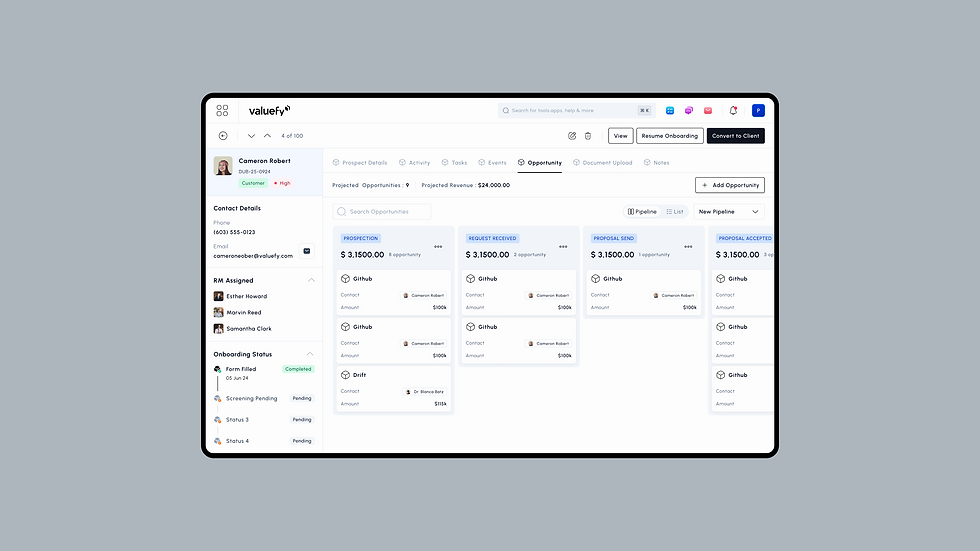
The Opportunity feature helps RMs manage deals with prospects efficiently. It organizes deals according to the sales pipeline, giving a clear view of their progress and ensuring every opportunity is tracked from start to finish.


FEATURE 4
Event Scheduling: - Plan and Execute with Ease
The Events feature integrates a calendar to schedule and manage activities related to prospects. RMs can book meetings, set reminders, and organize tasks or deals, ensuring timely follow-ups and seamless coordination.

FEATURE 5
Document Vault - Store and Access Files
The Document Vault is a centralized space where all documents related to a prospect are collected and organized. It ensures that important files are securely stored and easily accessible whenever needed, simplifying document management for RMs.

Other screens
Some of the other screens & pages designed for CRM.


That's all for CRM - thanks for your time!
© HP Dhanraj
Design Portfolio 2025